The technology industry has stopped giving new graduates time to ramp up slowly. Companies expect people to contribute from week one, not month six. According to LinkedIn’s 2025 Workplace Learning Report, 89% of hiring managers in tech said they now prioritize hands-on tool proficiency over GPA when evaluating entry-level candidates, a shift that has accelerated noticeably over the past two years. For students pursuing computer science and design, this means technical knowledge by itself is no longer the differentiator it used to be. What separates candidates who get hired from those who get passed over often comes down to a fairly specific list: the tools every CS student should learn and the tools every design student should learn, and whether a candidate can actually demonstrate fluency with them rather than just listing them on a resume. This blog walks through that list in full, covering coding, design, AI, collaboration, and the often-overlooked soft skill tools that round out a genuinely job-ready profile.
Why Tool Proficiency Matters for CS & Design Students
Knowing why tools matter before diving into the list itself helps frame everything that follows. It is not about collecting software names. It is about closing the gap between classroom theory and what a real job actually demands on day one.
Employers Prefer Job-Ready Graduates
Companies hiring for entry-level technical and design roles have largely stopped treating onboarding as a multi-month training period. They expect new hires to be able to open the tools they will use daily and already know their way around them. Candidates who walk in with hands-on experience using the actual software stack a company runs on get fast-tracked through interviews in a way that pure academic credentials rarely achieve on their own. Programs like edept’s B.Tech in Computer Science and Design are built specifically around this reality, giving students direct tool exposure across coding, design, and AI workflows before they ever enter a hiring process.
Practical Skills Improve Employability
A resume that lists “proficient in Python” without any project evidence carries far less weight than one that links to a GitHub repository with real, working code. Practical skills, demonstrated rather than claimed, are what move a candidate from the maybe pile into the yes pile during recruiter screening.
Industry Tools Improve Productivity
Students who learn industry-standard tools during their education work faster and make fewer avoidable mistakes once they enter the workforce. Someone who has already debugged in Visual Studio Code or built wireframes in Figma does not need to learn the basics on company time, which makes them more valuable from day one rather than three months in.
Better Collaboration Across Teams
Modern tech work rarely happens in isolation. Engineers, designers, and product managers constantly hand work back and forth, and the tools used for that handoff- version control systems, shared design files, project boards- all require a baseline fluency that students who have never touched them simply do not have walking in the door.
Essential Coding Tools Every CS Student Should Learn
Coding tools form the foundation of nearly everything a computer science student will do professionally. These are the tools every CS student should learn first, because they show up across nearly every technical role regardless of specialization.
Visual Studio Code
It runs light, customizes deeply, and is sitting on the machines of most professional developers working today. That last point matters more than any feature list. Why it matters: Teams already use it. Knowing it before you arrive means one less thing to figure out during your first weeks on the job. Use cases:
- Writing and editing code across languages without switching tools
- Debugging applications directly in the editor rather than hunting through separate software
- Extending functionality through plugins built specifically for the frameworks you are already working in
GitHub
GitHub sits at the center of how professional software development actually moves between people, and it doubles as the most credible portfolio a CS student can put in front of a recruiter. Why it matters: An active, well-documented repository communicates competence in a way that no resume section can match. Recruiters check GitHub before interviews more often than students realize.
Postman
Postman has become essential for anyone working with APIs, which cover a significant portion of modern backend development work. Why it matters: API testing, backend development verification, and automated testing workflows all run through Postman in professional environments, making it one of the more practical software tools for developers to learn early.
Docker
Docker solves a problem every developer eventually runs into: code that works perfectly on one machine and breaks on another. Why it matters: Environment consistency and deployment readiness are two things hiring teams in backend and DevOps roles expect candidates to already understand.
Jupyter Notebook
For students pointed toward data science or AI work, Jupyter Notebook is less optional than most course catalogs make it seem. Why it matters: Its iterative, visual approach to running Python code makes it the practical standard for data science and AI experimentation, which means students who have never opened it arrive at a disadvantage in those roles.
Essential Design Tools Every Design Student Should Learn
Design tools shape how ideas move from concept to something a user can actually interact with. These are the tools every design student should learn to build a portfolio that genuinely competes in 2026 hiring.
Figma
Figma has become the dominant tool in UI/UX design, replacing much of what older design software used to handle separately. Why it matters: Its role as the industry standard for UI/UX design means knowing it is not really optional for design students anymore. Not knowing it is a gap that comes up in interviews.
Adobe Photoshop
Photoshop has been around long enough that newer tools have tried to replace it, but none have fully succeeded in image editing and branding work that requires real precision. Why it matters: Pixel-level control over visual design and image editing still runs through Photoshop in most professional design environments.
Adobe Illustrator
Illustrator handles the vector side of design work that Photoshop is not built for. Why it matters: Branding assets, scalable logos, and UI graphics that need to look sharp at any size all depend on vector tools, and Illustrator remains the industry reference point for that kind of work.
Canva
Canva has earned its place among essential design tools for students by making fast, professional-looking output accessible without a steep learning curve. Why it matters: Presentation design and marketing asset creation move considerably faster in Canva than in more complex design software, which matters when speed is part of the job requirement.
Framer
Framer sits at the intersection of design and development, letting students build interactive prototypes that feel close to a finished product. Why it matters: Modern web design increasingly expects designers to produce prototypes that simulate real interaction rather than static mockups, and Framer is built specifically for that purpose.
AI Tools CS & Design Students Should Learn in 2026
AI tools have moved from optional extras to a genuine part of how technical and creative work gets done. This section covers the AI tools for students that are reshaping coding, learning, and design workflows across the industry right now.
ChatGPT
ChatGPT has become a daily companion for many students and professionals working through technical or creative problems. Use cases:
- Debugging code when the error message is not telling you enough
- Learning unfamiliar concepts through back-and-forth conversation rather than sitting with dense documentation
- Generating and stress-testing ideas before committing time to any single direction
GitHub Copilot
Use cases:
- Suggesting code completions in real time while you type, inside the editor rather than in a separate tab
- Handling boilerplate and repetitive code automatically so attention stays on the parts that actually require judgment
Notion AI
Use cases:
- Speeding up note-taking, planning, and documentation without losing the structure that makes those things useful
- Drafting written content faster without abandoning editorial control over what the final version actually says
AI-Powered Design Tools
Examples:
- Image generation tools for producing concept visuals without a full production pipeline behind them
- Mockup creation tools that cut down the time between a brief and something reviewable
- UI ideation tools that propose layout and component directions based on a written description of what is needed
Collaboration Tools Used in Tech Companies
No technical or design role exists in isolation inside a real company. Understanding the collaboration tools teams actually rely on is just as important as mastering coding or design software itself.
Slack
Slack has become the default communication platform inside most tech companies, replacing email for day-to-day team conversation.
Notion
Notion functions as a shared knowledge base where teams document processes, plans, and project context in one accessible place.
Jira
Jira tracks development work in sprint-based and agile environments, which describes the operating model of most software teams. Arriving with a working understanding of it signals familiarity with how professional development actually runs.
Trello
Trello handles lighter project tracking in a visual, board-based format. Smaller teams and less complex projects gravitate toward it over Jira, and knowing both covers the range of environments students are likely to encounter in early roles. Workplace collaboration depends heavily on fluency with tools like these. A student who has never touched Jira or Slack faces an unnecessary learning curve in their first weeks on the job, time that could otherwise go toward actual contribution.
Tools for UI/UX and Product Development
UI/UX and product development sit at the practical core of what CS and design students are increasingly expected to handle together, rather than as entirely separate disciplines.
Wireframing Tools
Wireframing tools help designers map out structure and flow before investing time in visual polish, keeping early-stage decisions focused on usability rather than aesthetics.
Prototyping Tools
Prototyping tools, including Figma and Framer covered earlier, let designers simulate real interaction so stakeholders and users can test a concept before any code gets written.
User Testing Tools
User testing tools gather real feedback from real users, which is what separates design decisions grounded in evidence from ones based purely on internal opinion.
Design Systems
Design systems bring consistency across a product by standardizing components, spacing, and visual language, and familiarity with how design systems function is increasingly expected of design students entering product teams.
Tools for AI, Data Analytics, and Emerging Tech
AI and data analytics have worked their way into nearly every corner of the tech industry, and the tools that come with them show up consistently across job listings for computer science students.
Python Ecosystem
Python is still the language of choice for data science and AI work, and most of the practical heavy lifting happens through its library ecosystem. Libraries:
- NumPy handles numerical computing and array operations
- Pandas covers data manipulation and analysis
- TensorFlow is used for building and training machine learning models
Cloud Platforms
Most modern applications run on the cloud now, so knowing at least one major provider has become something close to a baseline expectation rather than a nice extra. Mentioned platforms:
- AWS, still the most widely used cloud platform in the industry
- Microsoft Azure, especially common in enterprise settings
- Google Cloud is gaining ground fast for AI and data-heavy workloads
Data Visualization Tools
These tools take raw numbers and turn them into something stakeholders can actually look at, understand, and act on without needing a data background. Examples:
- Tableau, used for interactive dashboards and business intelligence reporting
- Power BI, doing similar work and especially common in Microsoft-heavy enterprise environments
Soft Skill Tools Students Often Ignore
Technical and design tools get most of the attention, but a separate category of tools quietly shapes how employable a candidate actually is once interviews start.
Presentation Tools
Presentation tools matter more than students expect, since communicating technical work clearly to non-technical stakeholders is a skill that gets tested constantly in real jobs.
Documentation Tools
Documentation tools keep projects understandable to anyone who picks them up later, and the habit of documenting work clearly is one employers notice quickly in new hires.
Communication Tools
Communication tools, beyond just Slack, include anything that helps a student explain their thinking clearly, whether that is written updates or structured meeting notes.
Project Planning Tools
Project planning tools build the habit of breaking large work into manageable pieces, a skill that transfers directly into how professional teams operate day to day.
Common Mistakes Students Make While Learning Tools
Learning the right tools is only half the equation. How students approach learning them matters just as much, and a few recurring mistakes consistently hold people back.
Learning Too Many Tools at Once
Trying to learn five new tools simultaneously usually means becoming mediocre at all five rather than genuinely proficient in any of them. Depth beats breadth, especially early on.
Focusing on Tools Without Fundamentals
Tools change. Fundamentals do not. Students who chase the newest software without understanding the underlying coding tools for students or design principles end up with skills that age out quickly.
Ignoring Real Projects
Tutorials teach syntax. Real projects teach judgment. Students who skip building actual projects rarely develop the troubleshooting instincts that come from things going wrong in unpredictable ways.
Not Building a Portfolio
Even strong tool knowledge means little without proof. A portfolio is what turns “I know Figma” into something a recruiter can actually evaluate.
How to Learn These Tools Effectively
Knowing which tools matter is one thing. Learning them in a way that actually sticks and translates into job readiness is a different challenge entirely, and it follows a fairly consistent pattern.
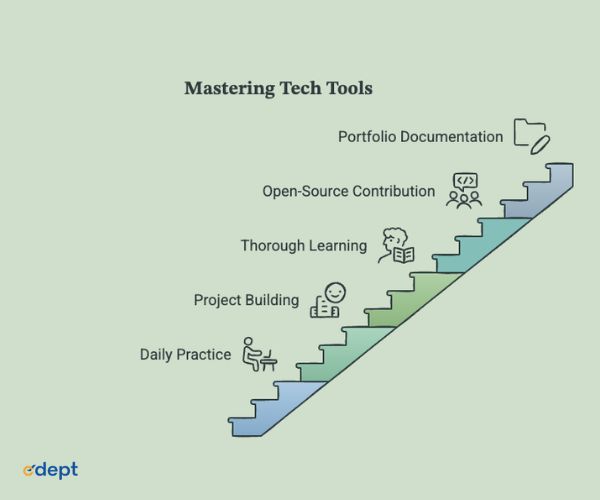
1. Start With Core Tools
Begin with the small set of tools every CS student should learn or every design student should learn for their specific track, rather than spreading attention across everything at once.
2. Practice With Projects
Apply each tool to a real, even if small, project. This is where surface familiarity turns into genuine working knowledge.
3. Build a Strong Portfolio
Document the projects built along the way. A portfolio is the single most persuasive piece of evidence a student can bring to an interview.
4. Learn Through Internships
Internships expose students to how tools actually get used inside real workflows, which is often quite different from how they are taught in a classroom setting.
5. Stay Updated With Industry Trends
The tools considered standard today will shift over time. Staying loosely aware of what is gaining traction keeps a student’s skill set from quietly going stale.
Why Tool Proficiency Improves Career Opportunities
Tool proficiency is not just a learning exercise. It translates directly into measurable career outcomes that matter once a student starts applying for roles.
Stronger Resume
A resume listing tools backed by visible project work reads completely differently than one with a generic skills section. Specificity signals genuine competence.
Better Internship Opportunities
Students who walk into internship interviews already comfortable with industry-standard tools consistently outcompete those who are starting from zero.
Faster Skill Development
Once a student is comfortable with core tools, picking up adjacent or more advanced ones becomes noticeably faster, building real momentum.
Higher Employability
Ultimately, the combination of all of this, demonstrated by tools, real projects, and a credible portfolio, is what makes a candidate genuinely employable rather than just academically qualified.
Why Choose edept for CS & Design Career Preparation
A syllabus alone does not build genuine tool proficiency. That takes structured, hands-on practice tied directly to what employers are actually hiring for, and edept’s B.Tech in Computer Science and Design at World University of Design is built around exactly that.
Industry-Aligned Curriculum
The B.Tech CSD course conducted by edept is divided into eight semesters, where students get knowledge on computer science and design principles. This is because the B.Tech CSD course starts with a foundation that contains more design elements in its first year and moves towards an interdisciplinary project in the fourth year. The course curriculum includes AI, machine learning, augmented reality and virtual reality, Internet of Things, robotics, and human-computer interaction, along with engineering principles.
Hands-On Tool Training
Students work directly with industry tools through partnerships with Deloitte, IBM, HEX, Practera, and Upsimpl. The edept collaboration gives students structured internship access, IBM Watson and IBM Cloud tool exposure, and a joint IBM and NASSCOM certification. Through HEX, students work on live client briefs spanning UX research, digital product design, and data-driven storytelling alongside working professionals.
Practical Projects and Labs
WUD’s campus houses signature learning spaces that go well beyond standard computer labs: an Immersive Media Lab for AR/VR/MR development, an AI and Interaction Studio focused on human-AI interfaces, a Motion Capture and Game Lab, a Digital Fabrication Workshop, and a Usability and User Research Lab equipped with eye-tracking systems. Every semester includes a live studio project assessed through industry juries rather than standard exams.
Future-Focused Learning
The program prepares students for roles at the cutting edge of industries through exposure to next-generation technologies, including generative AI, immersive media, robotics, and physical-digital systems. The students benefit from the Deloitte Learning Academy, through which they get to take self-paced professional courses in AI, data analytics, cybersecurity, and digital transformation and receive Deloitte certifications that actually carry value in the job market.
Placement-Oriented Approach
WUD equips students with the skills. edept ensures they land the role. Together, they provide 100% placement support backed by a 300+ company recruiting network. Graduates have secured roles across product and design engineering, immersive experiences, AI experience design, data and systems, and entrepreneurship. They get the highest package recorded at 24 LPA.
Future Outlook: Tools Defining Tech Careers Beyond 2026
The tools that define a tech career will not stay still, and students who keep half an eye on where things are heading end up with a real edge over peers who only bother learning what is standard right now.
AI-Driven Development Tools
AI-assisted coding and design tools are going to keep working their way deeper into everyday workflows. Fluency with them is shifting from a nice-to-have skill to something closer to foundational.
No-Code and Low-Code Platforms
These platforms are quietly widening who gets to build things and how. CS and design students who get comfortable with them open up flexibility across a much broader range of roles than their tools alone would suggest.
Cloud-Based Collaboration Tools
Locally installed software keeps losing ground to cloud-based collaboration, which means browser-based, remote-friendly tools are becoming a bigger and more central part of everyday technical and design work.
Human-AI Workflows
The most valuable professionals going forward will be those who know how to work alongside AI tools effectively, rather than either ignoring them or relying on them blindly.
Cross-Disciplinary Tool Integration
The line between CS and design tools will keep blurring, with platforms increasingly supporting both coding and design work inside the same collaborative environment.
Conclusion
Tool proficiency has stopped being a nice-to-have for computer science and design students and has become close to a baseline expectation. Employers across the industry increasingly look for graduates who arrive with hands-on experience in coding, design, AI, and collaboration tools rather than theoretical knowledge alone. Practical exposure and project-based learning are what convert tool familiarity into genuine career readiness, and that distinction matters more with each hiring cycle. According to GitHub’s 2026 Octoverse Report, students and early-career developers who maintain active public repositories are 2.3 times more likely to receive interview callbacks compared to those without demonstrable project history. The tools every CS student should learn and the tools every design student should learn are not static lists either. They shift as the industry shifts, which means the habit of learning, applying, and documenting new tools matters more than memorizing any single list. Students who build that habit now, and who pair it with real project work, will be considerably better prepared for the technology careers waiting for them in 2026 and beyond. A successful tech career does not only depend on what one has learnt in class but also depends on the acquisition of experience, the use of appropriate tools, and always keeping oneself up-to-date. This is the philosophy upon which edept offers its B.Tech in Computer Science & Design program, whereby students acquire solid technological skills by solving real-world problems using appropriate technologies. Are you ready to make your first move into a technology career?