Data is growing faster than ever, but turning it into useful insights remains a challenge. This guide covers the top 10 data analytics tools for beginners, including SQL, Excel, Python, Power BI, and more. You will also explore the best data analytics software and best AI tools for data analytics that simplify analysis, automate tasks, and improve decision-making. Whether you are just starting or building practical skills, this blog helps you understand how each tool fits into real workflows. By the end, you will have a clear list of data analysis tools and a strong foundation to begin your analytics journey with confidence.
If you have looked into any data-focused report from 2025, one trend jumps out right away! Data pours in much faster than teams can turn it into smart decisions. Organisations today are drowning in information, but many still struggle to pull out timely, actionable insights. That gap explains why data analytics tools for beginners are not just nice to have anymore; they form the foundation for transforming raw data into choices that count.
Take IBM’s 2025 Cost of a Data Breach Report. It shows the global average cost of a breach dropped to $4.44 million, a 9% dip from 2024. A big change? The rise of AI and automation has allowed organisations to identify and address threats more quickly. Firms that leaned heavily into AI-driven security actually shaved off nearly $1.9 million per breach.
These statistics underline how data analytics and AI link directly to sharper decisions and tougher organisational resilience. In this guide, we spotlight beginner-friendly analytics tools and unpack how AI-powered options team up with classic ones. The result? Quicker learning curves and a hands-on feel for real-world data analysis.
What Are Data Analytics Tools?
Data analytics tools mean software and platforms that simplify handling data, from gathering and tidying it to probing and picturing it. They shine a light on patterns, trends, and nuggets of insight that might slip by unnoticed.
For newcomers, these tools keep things straightforward and approachable. You do not need much tech know-how to link up data sources, fire off simple queries, whip up charts, and craft reports that make sense at a glance. Today’s data analytics software often bundles querying, cleaning, and visualisation in one seamless spot. That setup lets you begin modestly and ramp up to trickier jobs as confidence builds.
Why Are Data Analytics Tools Important in 2026?
Here’s a quick breakdown of why data analytics tools matter for beginners:
- Data analytics tools for beginners help you work on real datasets instead of just theory.
- They make it easier to identify trends, test ideas, and draw useful conclusions quickly.
- Good data analytics software lets you present insights through simple charts and visuals.
- Companies in 2026 are investing more in user-friendly tools across teams.
- Learning these tools improves your job readiness in India’s growing tech and analytics industry.
Types of Data Analytics Tools
Today’s data analytics tools for beginners sort into a handful of key buckets. Each handles a slice of the journey, from scooping up raw data to crafting usable insights. Grasping these groups helps you choose wisely based on your spot now and your aims ahead.
Data Collection Tools
Data collection tools pull info from spots like websites, databases, APIs, and cloud setups. They ensure your starting data feels solid, uniform, and primed for action. Picture the scenario, one tool tracks visitor clicks on a site, while another links CRM, marketing, and ops systems to pool everything for a single analysis view.
Data Cleaning Tools
Data cleaning tools prep raw data by scrubbing duplicates, filling gaps, and standardising formats. Loads of data analytics software now bake in cleaning right there, so beginners stick to one workspace while turning chaos into neat, ready-to-analyse tables. Entries in any data analysis tools list often pack visual preprocessors. You fix typical glitches code-free, keeping it super approachable for starters.
Data Visualisation Tools
Visualisation tools turn raw numbers into clear charts, graphs, and interactive dashboards that are easy to understand and share. As part of data analytics tools for beginners, they help identify trends, compare categories, and communicate insights to non-technical audiences. Most data analytics software combines visualisation with querying, so you can move smoothly from analysis to visual output in one place.
Big Data Tools
Big data tools tackle massive datasets and knotty processing flows. These data analytics tools lean on spread-out systems to stash and crunch data over many machines, speeding up enterprise-scale work. They might seem daunting at first, but plenty of beginner-friendly data analytics software now simplifies big data via straightforward interfaces. Dip in gently without plunging into heavy tech depths.
Programming-Based Tools
Programming-based tools allow you to write code to clean, analyse, and model data. This data analytics tools list includes Programming languages like Python and R, which are widely used in both academia and industry. Learning the basics of these data analytics tools for beginners gives you the flexibility to build custom workflows that standard data analytics software may not support out of the box.
Read More: Data Science Courses After 12th and Graduation
Top 10 Data Analytics Tools in 2026
This data analysis tools list zeroes in on the best data analytics tools for beginners craving real, tactile practice. Each fits a pipeline stage, so mix and match beyond just one.
Explore Top 10 Data Analytics Tools List :
- SQL
- Excel
- Python
- Power BI
- Tableau
- Looker Studio
- R Programming
- Apache Spark and Hadoop
- DBT (Data Build Tool)
- Databricks
SQL
SQL (Structured Query Language) ranks as a must-have among data analytics tools for beginners tackling relational databases. Simple commands filter, join, and sum data, anchoring countless data analytics software flows. Nail SQL early, and you will grasp data structure and learn how to snag just the bits you need. It tops the skill list for launching your analytics path.
Excel
Microsoft Excel remains one of the most beginner-friendly data analytics tools. It comes with built-in functions, pivot tables, and simple charts. For beginners, it is an easy way to start with data analytics software without writing code. You can explore real datasets, test ideas, and create basic reports quickly. Even experienced professionals use Excel with more advanced data analysis tools for quick analysis, one-off tasks, and sharing insights with teams.
Python
Python has become a core data analysis tool, supported by powerful libraries like pandas, NumPy, and Matplotlib. As one of the most flexible data analytics tools for beginners, it allows you to work with different data formats, perform complex calculations, and create detailed visualisations. It also integrates well with the best AI tools for data analytics, making it easier to move from basic analysis to machine learning and automation as your skills grow.
Power BI
Power BI is widely used as data analytics software for creating interactive dashboards and reports. As a best data analytics tool for beginners, it offers a drag-and-drop interface combined with strong data modelling capabilities and smooth integration with Excel and other Microsoft tools. It also includes growing AI features, making it a good choice for those exploring the best AI tools for data analytics while still working in an easy-to-understand environment.
Tableau
Tableau is known as one of the leading data visualisation tools and a powerful data analytics software for business users. Its intuitive interface allows beginners to build professional dashboards with minimal coding while still connecting to complex data sources. It is often recommended among data analytics tools for beginners who want to focus on storytelling and clearly presenting insights to stakeholders.
Looker Studio
Looker Studio, formerly Google Data Studio, is a free and cloud-based data analytics software that connects easily with Google products and other platforms. In most data analysis tools lists for beginners, it stands out because of its low entry barrier and simple sharing options. It also works with the best AI tools for data analytics, including Google’s built-in insight features that help identify trends and patterns with less manual effort.
R Programming
R is a programming language designed specifically for statistics and data analysis, making it a strong data analytics tool for beginners interested in research or analytical roles. With packages like ggplot2 and dplyr, it supports clean data transformation and high-quality visualisations. Along with Python, it forms an important part of the data analytics software stack for those who want to go beyond basic reporting into deeper analysis and modelling.
Apache Spark and Hadoop
Apache Spark and Hadoop are widely used big data tools that process large datasets across multiple systems, placing them among more advanced data analytics tools. However, many beginner-level learning paths now include them to give a practical understanding of how large-scale analytics works in real organisations. Together, they form an important part of modern data analytics software stacks that handle both batch and real-time data processing at scale.
DBT (Data Build Tool)
dbt, or data build tool, helps modernise data analytics by transforming and modelling data directly inside data warehouses. In any data analysis tools list, it stands out as a beginner-friendly way to build reusable and well-structured pipelines. It works alongside other data analytics software to keep data preparation for dashboards clean, organised, and easy to repeat.
Databricks
Databricks is a unified data analytics software platform that brings together data engineering, analytics, and AI in one place. It is considered one of the best data analytics tools for moving beyond data analytics tools for beginners into more advanced workflows. As one of the best AI tools for data analytics, its integration with large language models and machine learning makes it a strong choice for analysts looking to grow into data science.
Best AI Tools for Data Analytics in 2026
AI is no longer just an add-on. It is becoming a core part of data analytics tools for beginners. These best AI tools for data analytics help you generate insights faster, automate repetitive tasks, and explain results in simple terms. Using them alongside traditional tools makes modern data analytics software more efficient and easier to use than older approaches.
- ChatGPT / Claude for Data Analysis
- Power BI Copilot (AI)
- Tableau AI (Tableau Pulse)
- Google Looker with Gemini AI
- Databricks AI Platform
ChatGPT / Claude AI
ChatGPT and Claude AI serves as a casual but the best AI data analytics tool, crafting SQL, fixing Python bugs, and unpacking results conversationally. Beginners tag-team it with data analytics software to hasten lessons and ease syntax recall. It augments, not replaces, real tools, shining brightest with practice on true data.
Power BI Copilot (AI)
Power BI’s Copilot slips AI help into data analytics software, taking English queries for auto-visuals or insights. A top best AI tool for data analytics pick, it skips fiddly steps for beginners while revealing the logic beneath. This AI-BI mix makes novices into smart analytics from the ground up.
Tableau AI (Tableau Pulse)
Tableau Pulse adds an AI layer to Tableau’s data analytics software by automatically highlighting important metrics and trends. As one of the best AI tools for data analytics, it reduces the time spent scanning dashboards. Beginners can quickly identify key insights and then explore the data further using Tableau’s full features.
Google Looker with Gemini AI
Google Looker Studio now includes AI-driven insights and anomaly detection within its data analytics software. These best AI tools for data analytics help highlight unusual patterns and suggest relevant visualisations, making it easier for beginners to understand data. Since it is free for many use cases, it is a good option for those starting with AI-powered analytics.
Databricks AI Platform
Databricks AI Platform combines its lakehouse architecture with generative AI capabilities, making it one of the best AI tools for data analytics for more advanced users. It allows you to build and deploy models, automate workflows, and generate clear summaries from large datasets. For those using data analytics tools for beginners and aiming for data science roles, it offers a scalable and future-ready data analytics software environment.
How to Choose the Right Data Analytics Tool
Here’s a simple guide to help you choose the right data analytics tool:
- Start with your goals and current skill level before selecting from data analytics tools for beginners.
- If you want quick visual insights, use drag-and-drop data analytics software like Power BI or Tableau.
- If you prefer coding, choose tools from a Python-based data analysis tools list.
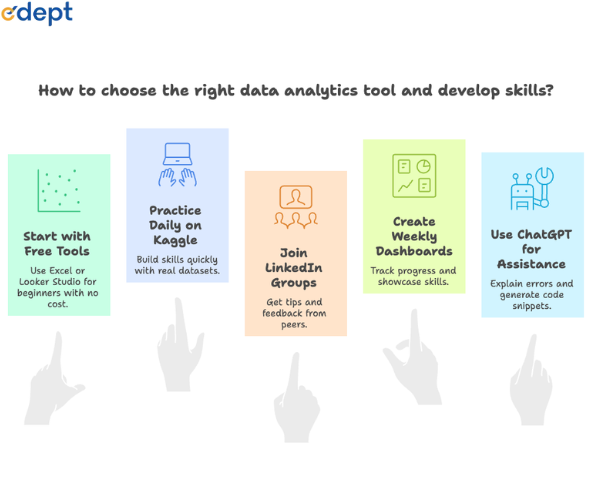
- Look for tools that offer free versions so you can learn without an upfront cost.
- Choose platforms with strong documentation and active communities for support.
- Focus on tools that help you build real projects, not just complete tutorials.
Also Read: Data Analytics Courses: A Complete Guide for Students After 12th & Graduation in India
Common Mistakes Beginners Should Avoid
Here are some common mistakes beginners should avoid in data analytics:
- Focusing only on one data analytics tool instead of learning core concepts.
- Ignoring basics like data quality and clear problem definition.
- Relying too much on the best AI tools for data analytics without understanding the logic behind them.
- Using data analytics software without testing assumptions or validating results.
- Not working on real projects to build practical experience.
- Accepting results without checking if they make sense in real-world situations.
Conclusion
Recent data from International Data Corporation highlights the scale of today’s data challenge. Global data volume is expected to reach around 175 to 181 zettabytes by 2025, yet only 2 to 3 per cent of this data is actually analysed. This shows that, while organisations generate huge amounts of data, much of it still goes unused for decision-making.
At the same time, demand for data infrastructure continues to grow. Industry estimates suggest that the global data centre market will expand from $418 billion in 2025 to nearly $692 billion in 2030, driven by analytics, cloud computing, and AI adoption.
These trends highlight a clear opportunity. The ability to work with data is becoming a core skill, especially for beginners. Using data analytics tools for beginners, along with the best AI tools for data analytics, helps turn raw data into meaningful insights and real business value.
If you want to build practical, industry-ready skills, working on hands-on projects with the data analysis tools listed here can help you prepare for real roles in India’s growing tech and analytics space.
Related Links: