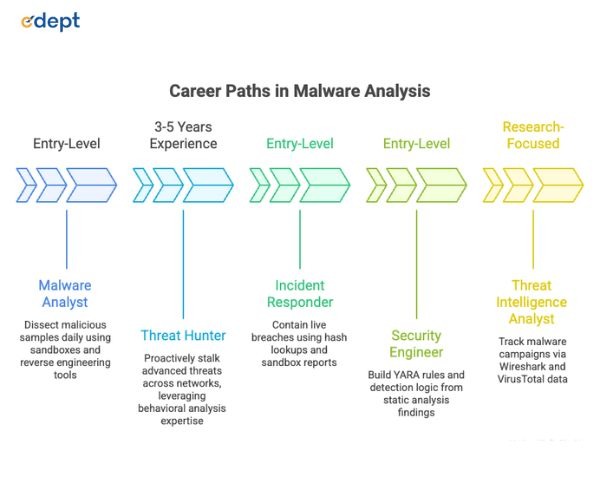
New to cybersecurity? Dive into malware analysis with this hands-on guide. Learn to build isolated labs using VirtualBox, spot threats via file hashing on VirusTotal, run safe sandbox tests with Cuckoo, and decode traffic in Wireshark. From static checks with PeStudio to reverse engineering in Ghidra, follow proven steps plus beginner safety tips. Perfect for students eyeing threat hunting or analyst roles in India’s tech hubs.
If you have looked at any cybersecurity report from 2025, the numbers are hard to sit with. Security researchers are finding an average of 560,000 new malware variants every single day. Organisations around the world dealt with an average of 1,968 cyberattacks every week in 2025 alone, which is 70% more than what was recorded in 2023. Behind every one of those attacks is malicious code that someone built, deployed, and in many cases adapted specifically to avoid detection. The people who know how to take that code apart and understand malware analysis are in short supply and high demand.
So, what exactly is malware analysis? It’s the process of carefully dissecting malicious software to figure out what it does, how it works, and its ultimate goals, helping defenders spot it quicker, contain it better, and prevent real damage.
This beginner-friendly guide takes you step by step through the essentials: how the malware analysis process flows, the key steps at each stage, building a safe lab setup, the top starter tools, and simple safety tips to keep you and your systems secure.
How Does Malware Analysis Work?
Malware analysis is the structured examination of a malicious program to figure out its purpose, its behaviour, and the damage it is capable of causing. Analysts look at how the code was written, what systems or data it targets, how it communicates with attackers, and what traces it leaves behind on an infected machine.
Malware analysis usually kicks off with fast automated scans, then shifts into deeper, hands-on inspection as each phase uncovers more details. Malware analysis techniques range from passive observation of file characteristics all the way through to reading disassembled code line by line. The malware analysis process is used by incident response teams, threat intelligence researchers, security engineers, and the developers behind malware detection software to understand what they are up against and build better defences against it.
Stages of Malware Analysis
The malware analysis process is not a single action carried out in isolation. It unfolds across several stages, each one building on what the previous stage uncovered. Getting familiar with these stages is the foundation of learning how malware analysis actually works in practice.
Automated Scanning
Automated scanning is the fastest first pass in the malware analysis process. Malware detection tools and malware analysis sandbox environments run the sample against known signature databases and behavioral heuristics to quickly flag whether something is malicious before any deeper work begins.
Static Analysis
Static analysis means examining the malware file without ever running it. Using malware analysis tools like PeStudio and Ghidra, analysts inspect file structure, embedded strings, metadata, and code patterns to build a picture of what the sample might do before execution takes place.
Behavioral Analysis
Behavioral analysis is where the malware actually gets executed, but inside a controlled malware analysis sandbox environment. The sandbox captures every action the sample takes in real time, including file system changes, network connections, registry modifications, and new processes created, revealing the malware’s true behavior without exposing any real systems.
Manual Code Analysis
Manual code analysis goes the deepest of all the malware analysis techniques. Analysts fire up reverse engineering tools to dive into and make sense of the sample’s raw assembly code or decompiled output. This stage is the most technically demanding but surfaces details that no automated malware analysis tools can find on their own, including obfuscated logic, encryption routines, and hardcoded attacker infrastructure addresses hidden inside the code itself.
Read More: Why Every Student Should Learn the Basics of Cyber Hygiene
Step-by-Step Malware Analysis Process
Working through a consistent malware analysis process keeps the work structured, safe, and repeatable every time. These represent the essential malware analysis steps that every beginner needs to grasp and weave into their routine right from day one.
Step 1: Identify File Type
Before anything else happens, you need to know what kind of file you are actually dealing with. Malware authors frequently rename or disguise files to make them look harmless, so relying on the file extension alone is a mistake. Tools like the Linux file command or TrID identify the true file type based on internal structure rather than the name given to the file, giving you a solid and reliable starting point for the rest of the malware analysis steps.
Step 2: Generate File Hash (MD5/SHA256)
Creating a cryptographic hash forms the bedrock of malware analysis. It’s typically the first move a seasoned analyst makes when handling a fresh sample. Options like MD5 or SHA256 spit out a one-of-a-kind digital signature for that precise file. With it, you can trace the sample reliably from one machine to the next, swap details securely with peers and scanning tools, and right away confirm if someone else has already flagged and dissected this exact beast.
Step 3: Hash Lookup (VirusTotal, etc.)
Once the hash exists, looking it up on platforms like VirusTotal, MalwareBazaar, or Hybrid Analysis is the next logical step in the malware analysis process. These services run the hash against dozens of malware detection software engines simultaneously and return results within seconds. A match to a known malicious sample tells you a great deal about what you are working with very early in the process, saving significant time before any deeper malware analysis techniques are applied.
Step 4: String Analysis
Running a strings extraction tool against the malware sample can surface plaintext information embedded inside the binary that malware authors did not bother to hide or forgot was there. URLs, IP addresses, file paths, registry keys, error messages, and function names can all appear in the output and provide genuine intelligence about the malware’s capabilities and the infrastructure behind it. Tools like FLOSS from Mandiant go further by also extracting strings that have been deliberately obfuscated, making this one of the most productive early malware analysis techniques a beginner can learn and apply quickly.
Step 5: Behavioral Analysis (Sandbox)
The last stage of this basic malware analysis workflow means detonating the sample inside a dedicated sandbox to see its behaviour play out in real time. Tools such as Cuckoo Sandbox spin up a totally sealed-off virtual world for the malware, grabbing details on every move it makes, like files it touches or trashes, network calls it tries, and any offspring processes it kicks off. That behavioural summary you get back delivers fast, practical clues about the malware’s real mission and the best ways to hunt it down in production environments.
How to Build a Safe Malware Analysis Lab
A proper malware analysis lab setup is not optional. Running live malware samples on a primary machine or inside a network you care about is genuinely dangerous, and an approach that experienced analysts never take. Building a properly isolated environment is what makes repeated malware analysis safe and sustainable. Here is how to do it correctly from the beginning.
Install Virtual Machine (VMware/VirtualBox)
The entire foundation of a good malware analysis lab setup is a virtual machine. VMware Workstation and VirtualBox are both widely used, well-documented, and free or affordable, depending on which version you choose. Virtual machines let you run a completely separate operating system inside your existing one, with the ability to roll everything back to a clean state instantly using snapshots. That rollback capability is precisely what makes repeated malware analysis practical for beginners who are working through different samples and learning how various malware families behave.
Choose OS (Windows/Linux)
The overwhelming majority of malware in the wild targets Windows systems, which makes a Windows virtual machine the most realistic and most commonly used environment for behavioural analysis of everyday samples. Windows 10 or Windows 11 VMs are the standard choice in most malware analysis lab setups. A Linux VM alongside it is also worth having for running many of the open-source malware analysis tools and for working with samples that target Linux servers or embedded devices. Most analysts who work with a range of samples maintain both in their malware analysis lab setup.
Network Isolation Setup
Network isolation is something that cannot be skipped or treated as optional in any malware analysis lab setup. Malware that reaches the internet during analysis can connect to attacker-controlled infrastructure, pull down additional payloads, or attempt to spread to other machines on the same network. Setting the virtual machine’s network adapter to host-only or completely isolated mode prevents any real outbound connections. Tools like INetSim or FakeNet-NG can simulate network services inside the isolated environment, letting malware behave as though it has connectivity without actually connecting to anything real outside the lab.
Disable Clipboard and Sharing
Shared clipboard functionality and file sharing features between a host machine and a virtual machine create potential escape paths that more sophisticated malware can exploit, particularly samples that are aware they are running inside a sandbox and actively try to break out of it. Disabling these features in the virtual machine settings before any malicious sample is introduced into the environment is one of those malware analysis lab setup steps that feels small but becomes genuinely critical when working with samples designed to detect and evade sandbox environments.
Use Snapshots
Snapshots are what turn a virtual machine into a genuinely reusable analysis environment rather than something that degrades and gets contaminated over time. Before running any sample, take a clean snapshot of the virtual machine in its known good baseline state. After the analysis finishes, restore that snapshot, and the environment returns to exactly how it was before the sample touched anything. This means hundreds of samples can be analysed using the same lab environment without accumulating changes or residual artifacts from previous sessions, which is the only sensible way to run a sustainable malware analysis lab setup.
Top Malware Analysis Tools
These are the malware analysis tools that beginners encounter most consistently and that professional analysts actually rely on across different stages of the malware analysis process. Each one serves a specific purpose, and they work best when used together rather than in isolation.
Process Hacker
Process Hacker is a free and open-source tool for monitoring running processes, network activity, and system resource usage in real time. During behavioural analysis, it sits at the top of most analysts’ toolsets because it shows exactly what a running malware sample is doing to the system at a process level, including memory injections, open handles, and suspicious process relationships that standard task managers would never expose. It is one of the most accessible tools for malware analysis that beginners can start using immediately.
Fiddler
Fiddler is a web debugging proxy that sits between a process and the network, capturing HTTP and HTTPS traffic and making it readable for analysis. It is particularly useful when working with malware that communicates over web protocols, letting analysts see exactly what data is being sent and received in a format that is easy to interpret. For beginners working with browser-targeting or web-based malware samples, Fiddler is one of the more immediately approachable tools for malware analysis available without requiring deep technical expertise to get useful output from.
PeStudio
PeStudio is a static analysis tool built specifically for examining Windows PE executable files without executing them. It pulls out a significant amount of useful information from a sample in one pass, including imports, exports, embedded strings, section characteristics, and behavioural indicators that suggest malicious intent. It is widely recommended as one of the first tools for malware analysis that beginners should spend time with because it is free, easy to navigate, and produces actionable output from the very first look at a new sample, even before any dynamic analysis begins.
Ghidra
Ghidra is a free and open-source reverse engineering framework developed and publicly released by the NSA. It is one of the most capable malware analysis tools available for manual code analysis work, allowing analysts to disassemble and decompile binary files into code that can actually be read and followed. Ghidra supports a wide range of file formats and processor architectures, which makes it one of the most versatile tools for malware analysis across different sample types and one of the first serious reverse engineering tools that beginners should invest time in learning properly.
Cuckoo Sandbox
Cuckoo is one of the most widely deployed open-source malware analysis sandbox platforms available to the security community. It runs samples automatically in a secure, isolated setup and spits out thorough behavioural reports. These cover file operations, registry tweaks, network activity, and process behaviours from start to finish of the execution. Cuckoo Sandbox is often the first automated analysis environment that beginners configure in their malware analysis lab because it provides rich and detailed output with a relatively manageable setup once the underlying virtual machine infrastructure is already in place.
Wireshark
Wireshark captures and displays network traffic in real time and is one of the most essential pieces of software in any analyst’s toolkit. During malware analysis, it is used to monitor every network action generated by a running sample, identifying outbound connections to command-and-control servers, data being exfiltrated, and any attempts to discover or spread to other machines on the network. It is among the most important malware detection tools for understanding the network behaviour of any sample and is used daily at every level of the security industry, from students to senior threat analysts.
IDA Pro
IDA Pro is the industry standard for professional disassembly and reverse engineering work. It is significantly more powerful and more complex than Ghidra and also considerably more expensive, but it is the tool that the majority of professional malware analysts reach for when doing serious manual code analysis. Most beginners start with Ghidra and progress toward IDA Pro as their skills develop, and the complexity of the samples they are working with outgrows what free tools can handle comfortably. It remains one of the most respected malware analysis tools in the entire field.
CrowdStrike Falcon Insight
CrowdStrike Falcon Insight is an enterprise endpoint detection and response platform that uses behavioural analysis, threat intelligence, and machine learning to detect and respond to malware at scale across large environments. It represents the category of malware detection software that organisations deploy to catch malware in production environments rather than in a lab. Understanding how platforms like Falcon Insight operate and what behavioural signals they rely on gives analysts important and practical context for the detection side of the malware analysis process that purely tool-based lab work does not always provide.
Also Read: How Cybersecurity Safeguards Data during the E-Commerce Boom
Beginner Tips For Safe Malware Analysis
Getting started in malware analysis is genuinely one of the most rewarding things someone entering cybersecurity can do, but doing it safely from day one requires building the right habits before they become an afterthought.
Never run a malware sample on your primary machine or any machine connected to a network you are not prepared to lose. Always verify that network isolation is active in your malware analysis lab setup before executing anything.
Start with known, documented samples from trusted repositories like MalwareBazaar or TheZoo rather than sourcing random files from unknown corners of the internet. Known samples have published analyses you can compare your own findings against, which is genuinely one of the fastest ways to learn whether your malware analysis techniques and workflow are producing accurate results.
Write everything down as you go through each malware analysis step. Good documentation builds a reference library that becomes increasingly valuable over time and helps you identify behavioural patterns across different sample families much faster than working purely from memory.
Cross-reference everything across multiple malware analysis tools rather than trusting a single output at any stage. Different tools surface different information, and the most complete and accurate picture of any sample always comes from combining what several tools find rather than treating any one source as definitive.
Finally, get involved in the community. Platforms like Any.run, forums, and Discord servers focused on threat intelligence share sample analyses, tutorials, and tool recommendations that accelerate learning significantly faster than working entirely in isolation ever will.
Related Links:
FAQs
1. What is the first step in malware analysis?
The very first step in the malware analysis process is identifying the true file type of the sample you are working with. File extensions are unreliable because malware authors change them deliberately to disguise what a file actually is. Using a tool to identify the file type based on its internal binary structure rather than its name gives you a trustworthy foundation for every subsequent malware analysis step that follows.
2. What is sandboxing in malware analysis?
A malware analysis sandbox creates a fully isolated virtual setup where you can safely execute and monitor malware, ensuring zero risk to your actual systems or live networks. It logs every single action the malware takes while running, like files it adds or removes, registry modifications, and attempted network connections, before delivering a detailed behavioural report that exposes exactly what the sample aims to accomplish, all while keeping real infrastructure completely untouched by the threat.
3. What is a file hash in malware analysis?
A file hash serves as a unique digital fingerprint for any malware sample, generated via algorithms like MD5 or SHA256. As a foundational step in malware analysis, it lets you reliably scan the file against detection tools and threat databases, monitor it across various systems, and share it safely with fellow researchers, all without distributing the actual harmful code itself.
4. How can malware be analysed?
Malware can be examined using a combination of malware analysis techniques that progress from faster, higher-level checks toward deeper manual investigation. The full malware analysis process typically moves through automated scanning, static file analysis, behavioural observation in a malware analysis sandbox environment, and finally manual code analysis using dedicated reverse engineering malware analysis tools for the most complex samples.
5. Which tools are best for beginners?
Newbies should kick off with PeStudio for static analysis, VirusTotal to check hashes and run quick automated scans, Cuckoo Sandbox for watching behaviour in a sealed-off setup, and Wireshark to snag and decode network traffic. These malware analysis tools are either free or freely accessible, are extensively documented across the community, and cover the most important stages of the malware analysis process without requiring advanced reverse engineering skills to get meaningful output from them.
6. Is malware analysis safe?
Malware analysis is completely safe when it is carried out inside a properly configured malware analysis lab setup. The non-negotiable requirements are a virtual machine with active network isolation, clean snapshots taken before every analysis session, and all sharing features between the host and virtual machine disabled. Following these steps consistently and without exception means malware samples can be examined thoroughly without any risk to your primary machine or any connected network infrastructure.